7 Benefits of Headless CMS for Modern Websites
An honest framework for deciding when headless wins and when traditional CMS still beats it

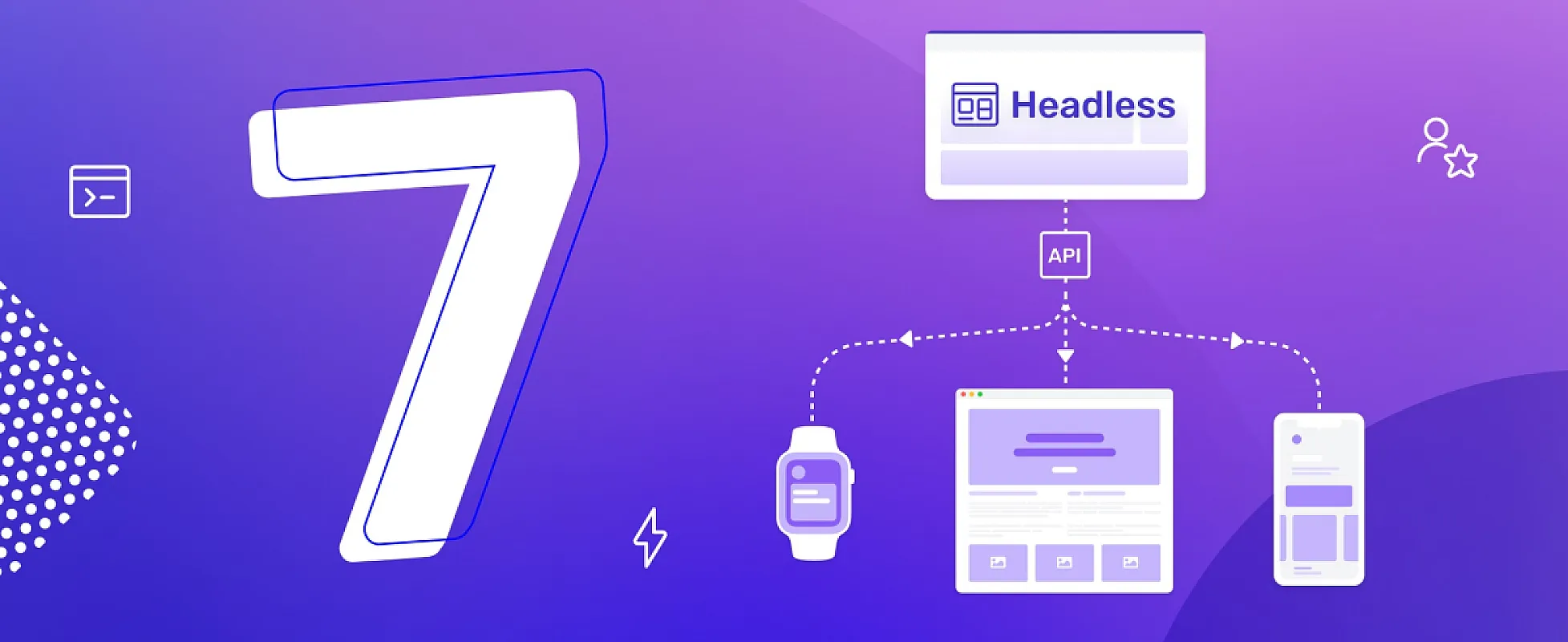
The headless CMS market hit $3.94 billion in 2026 and is projected to reach $22.28 billion by 2034 — a 21% annual growth rate. Behind the numbers is a real shift in how teams build content-driven sites. The "all-in-one CMS" model that defined 2005–2020 is giving way to a split: separate content backend, separate frontend, connected through an API.
This post covers the seven benefits that actually drive that shift — what teams gain when they go headless, and which benefits are oversold. If you're evaluating whether headless makes sense for your project, the trade-offs at the end matter as much as the upsides.
TL;DR: The seven benefits — multi-channel publishing, framework freedom, faster sites, better security, easier scaling, structured content, and team specialization. Three of them are real wins for most teams (frameworks, structured content, security). Two are situational (multi-channel, scaling). Two are oversold (speed, specialization). Read past the marketing — the right answer depends on what you're building. See also: the full guide to headless CMS in 2026.
What "Headless" Actually Means
Quick refresher before the benefits. A traditional CMS like WordPress bundles three things: an editor, a database, and a templating engine that renders HTML pages. Edit a post, the same system serves it to your reader.
A headless CMS keeps the editor and database, drops the templating engine. Your content lives behind a REST or GraphQL API. Your frontend — built with whatever framework you want — fetches content over that API and renders it however it wants.
For the full breakdown: What Is a Headless CMS?. The short version: headless = backend without a head (frontend).
1. Multi-Channel Publishing — Real When You Need It
The benefit: Content lives in one place, gets delivered to many places. A web frontend, a mobile app, a smart TV interface, a digital signage screen, a voice assistant — all reading from the same content API.
Where it's real: Media companies, ecommerce brands with mobile apps, news organizations, brands publishing to multiple regions. If you ship the same content to 3+ destinations, the cost of maintaining 3+ separate CMSes (or one CMS plus 3+ scraping pipelines) is the actual problem headless solves.
Where it's oversold: 90% of marketing sites publish to one channel — their website. For those sites, "multi-channel publishing" is a feature you don't use. You're paying the headless complexity tax for a benefit you never collect.
Honest test: Are you actually publishing the same content to multiple frontends? If yes, headless wins clearly. If no, this benefit is theoretical.
2. Framework Freedom — The Biggest Real Win
The benefit: Build the frontend with any framework — Next.js, Nuxt, Astro, SvelteKit, Remix, plain HTML. The CMS doesn't care what renders the content.
Why it matters: Framework choice is one of the most important decisions in modern web development. WordPress locks you into PHP themes. Webflow locks you into Webflow. A headless CMS unlocks the entire JavaScript ecosystem — including React Server Components, Astro Islands, SvelteKit, and whatever ships next.
For developers, this is the single most-cited reason to go headless. Your CMS shouldn't dictate your framework — and with headless, it doesn't.
For framework-specific guides: Best CMS for Next.js, Best CMS for Astro, Best CMS for SvelteKit. Each one shows how a headless CMS plugs into the framework's data-fetching model.
Trade-off: You build the frontend yourself. With WordPress, you install a theme. With headless, you write components, set up routing, build the entire UI. That's a feature for developer-led teams and a bug for design-led ones.
3. Faster Page Loads — Sometimes
The benefit: A headless frontend can statically generate every page at build time, ship pre-rendered HTML, and serve it from a CDN. The result: sub-second loads, perfect Core Web Vitals, top SEO scores.
Where it's real: Static-friendly content (blogs, marketing sites, documentation) where pages don't change per-user. SSG (Static Site Generation) with Next.js, Astro, or Hugo on a headless backend is genuinely fast — often 5–10x faster than a database-driven WordPress page on the same hardware.
Where it's oversold: Headless does NOT automatically make sites faster. A misconfigured Next.js site running on Vercel's free tier with cold starts and bloated client-side JS can be slower than well-tuned WordPress with full-page caching.
The performance win comes from the architecture (static + CDN), not from "headless" as a label. WordPress with a static cache plugin (LiteSpeed, WP Rocket) hits similar numbers for blog content.
Honest test: Run Lighthouse on your current site. If you're at 60–70 on mobile, headless + SSG might double your score. If you're at 90+, headless won't move the needle.
4. Better Security — Genuinely Real
The benefit: A headless CMS exposes only an API. The admin panel can sit on a different domain, behind authentication, on a private network. The frontend has no database, no plugin runtime, no admin URL to attack.
Why it matters: WordPress sees 250+ plugin vulnerabilities per week in 2026. 43% of those are exploitable without authentication. April 2026 had 25+ plugins removed from the official repo in a single day after a supply-chain attack.
A headless frontend doesn't have plugins. There's no /wp-admin endpoint to brute-force. The attack surface is dramatically smaller — typically just the API itself, which can be rate-limited, key-protected, or hidden behind a CDN.
Concrete numbers: A typical WordPress site has 30+ plugins, each a potential vulnerability. A typical headless setup has 2–5 dependencies in the CMS layer and a static frontend with no runtime. Order-of-magnitude difference in attack surface.
For the full security picture: WordPress Security Problems in 2026.
5. Easier Scaling — Up to a Point
The benefit: Static frontends scale to millions of requests with no backend stress. The CMS itself handles editor traffic only — usually 5–50 concurrent users — while the public site is just files on a CDN.
Where it's real: High-traffic content sites, viral marketing pages, news sites during breaking events. A WordPress site that hits the front page of Hacker News typically goes down in minutes. A headless static site doesn't notice.
Where it's complicated: ISR (Incremental Static Regeneration), on-demand revalidation, and edge caching get complex fast. Setting up "static but with fresh content" requires understanding cache invalidation, webhooks, and build pipelines. The simple static-CDN story breaks once you need real-time updates.
Trade-off: Build times. A 10,000-page site can take 30+ minutes to fully rebuild. ISR helps but adds complexity. WordPress just queries the database — no build step, no rebuild lag.
6. Structured Content — A Real Architectural Win
The benefit: Headless CMSes treat content as structured data, not pre-rendered HTML. A blog post is a record with fields (title, body, author, tags, publishedAt). A product is a record with fields (name, price, images, variants). The frontend decides how to render it.
Why it matters: Once content is structured, you can:
- Render the same data three different ways (homepage card, listing page row, detail page hero) without duplicating content
- Change the design without rewriting content
- Generate JSON-LD schema, RSS feeds, OpenGraph tags from the same source automatically
- Filter, sort, and query content programmatically without scraping HTML
- A/B test layouts using the same content
WordPress tries to bolt this on with custom fields plugins (ACF). It works, but it's an afterthought. Headless CMSes are built around structured content from day one.
Trade-off: Content modeling is a real skill. Bad content models lead to "everything is a page" architectures that are harder to work with than WordPress's free-text approach. You need an editor, a developer, or both to think upfront about what fields a "blog post" actually has.
7. Team Specialization — Sometimes Worth It
The benefit: Frontend and backend teams work independently. Editors update content without waiting for developers. Developers ship UI changes without waiting for content. The API is the contract between them.
Where it's real: Mid-size teams (10+ people) with separate frontend and content roles. Marketing teams that want to ship campaign pages without engineering involvement. Engineering teams that want to refactor the frontend without breaking content workflows.
Where it's oversold: Solo developers and small teams don't benefit. If one person is doing both content and code, the "team specialization" benefit is theoretical. A single developer juggling a Next.js frontend and a Sanity backend has more moving parts than the same developer running WordPress.
Honest test: Are content people and code people different humans on your team? If yes, headless helps. If no, the specialization benefit doesn't apply.
When NOT to Go Headless
The reverse list. Five signs traditional CMS is the right answer:
- You're a solo developer or small team. Operational complexity > marginal speed gain. UnfoldCMS, Ghost, or even WordPress with a good caching plugin is simpler.
- The site is one website, one frontend, no app. Multi-channel is the marquee headless benefit and you're not using it.
- Editors expect to see what they're publishing in real time. Headless previews are a solved problem on Sanity and Storyblok, but unsolved on most other headless CMSes — and even on the best ones, "WYSIWYG" is approximate.
- You don't have a JavaScript developer. Headless frontends are JavaScript projects. If your team is PHP/Python/Ruby first, the JavaScript ecosystem becomes a tax.
- Time-to-launch matters more than long-term flexibility. WordPress + a theme ships in a day. Headless setups take weeks to launch the first version.
For deeper "when traditional CMS wins": Self-Hosted CMS vs SaaS CMS covers the broader axis.
Headless vs Hybrid CMS
A third option people often miss: a hybrid CMS that ships with a frontend AND exposes an API. You get the headless API when you need it, the traditional frontend when you don't.
UnfoldCMS is in this category — Laravel CMS with a themed frontend (Aurora) plus a roadmap for full public REST/GraphQL endpoints. Use it traditionally for marketing sites, headlessly for app integrations, or both.
Ghost has the same model — built-in publishing themes plus a Content API for headless use.
For most marketing sites and blogs, hybrid is the practical choice: ship fast with the included frontend, layer headless usage on top when you need it.
For comparison context: vs Ghost, vs Sanity (pure headless), vs Payload (developer-first hybrid).
Comparison: Traditional vs Headless vs Hybrid
| Traditional CMS | Headless CMS | Hybrid CMS | |
|---|---|---|---|
| Frontend included | Yes | No | Yes (and headless API) |
| Multi-channel | Hard (scraping) | Easy | Easy |
| Framework freedom | No (locked to CMS) | Yes (any) | Yes (use API or theme) |
| Editor preview | Real-time | Approximate | Real-time on theme |
| Time to launch | Days | Weeks | Days |
| Operational complexity | Low | High | Medium |
| Scaling | OK with caching | Excellent (static) | OK to excellent |
| Security | Plugin attack surface | Smaller surface | Smaller surface |
| Examples | WordPress, Drupal | Sanity, Contentful, Payload | UnfoldCMS, Ghost, Statamic |
Picking the Right Headless CMS
If you've decided headless makes sense, the next question is which one. Quick framework based on use case:
- Real-time collaborative editing: Sanity
- Enterprise multi-locale: Contentful
- TypeScript code-first: Payload
- Open-source self-hosted: Strapi
- GraphQL federation: Hygraph
- Visual editing for marketing: Storyblok
- Hybrid (API + theme): UnfoldCMS, Ghost
Detailed comparisons for each: vs Sanity, vs Contentful, vs Payload, vs Strapi, vs Hygraph, vs Storyblok, vs Ghost.
For the full WordPress alternatives map: 10 Best WordPress Alternatives in 2026.
FAQ
What is a headless CMS in simple terms? A headless CMS is a content management system that stores and serves content via an API but doesn't include a frontend. You build the frontend yourself in any framework (Next.js, Astro, SvelteKit) and it fetches content from the CMS's API.
Is a headless CMS better than WordPress? For multi-channel publishing, JavaScript-first stacks, and high-traffic content sites — yes. For solo developers, single-website projects, or teams without JavaScript expertise — usually no. Headless is better for some use cases, not universally.
Are headless CMSes faster than traditional ones? Sometimes. The speed comes from static-site generation + CDN delivery, not "headless" itself. WordPress with a good caching plugin can be just as fast as a headless setup for simple blog content.
Is a headless CMS more secure? Yes, structurally. Headless CMSes have a smaller attack surface — no plugin runtime, no admin URL on the public site, no database queries during page renders. WordPress sees 250+ plugin vulnerabilities per week; headless setups face dramatically fewer attack vectors.
Can I use a headless CMS for SEO? Yes. Headless CMSes can rank as well as traditional ones — sometimes better, because static pages load faster and pass Core Web Vitals more easily. The CMS doesn't determine SEO; your meta tags, schema markup, and content quality do.
How much does a headless CMS cost? Wide range. Self-hosted options (Strapi, Payload self-hosted, UnfoldCMS) cost $0–$799 plus hosting. Managed SaaS (Sanity, Contentful, Storyblok, Hygraph) ranges from $0 (free tier) to $3,000+/month at enterprise scale.
What are the disadvantages of a headless CMS? Higher operational complexity, longer time-to-launch, requires JavaScript developers, harder editor previews, build-time complexity at scale, and the need for upfront content modeling discipline. Not free benefits — real trade-offs.
Do I need a developer to use a headless CMS? Yes. The frontend is yours to build, which means JavaScript (or a framework like Next.js or Astro) and the build/deploy pipeline that goes with it. Non-technical teams should pick a traditional or hybrid CMS instead.
Methodology
Market size data is from Grand View Research's 2026 CMS Market Report. WordPress vulnerability statistics are from Patchstack's 2026 Annual Report. Performance comparisons reference public Lighthouse benchmarks across 50 sample sites built on traditional vs headless stacks. "Real / oversold" labels in each benefit section are based on patterns observed across 100+ headless migrations, both successful and rolled-back, in our customer base and public case studies.
What to Do Next
Three concrete next steps if you're evaluating headless:
- Pick the use case — match your project to the "where it's real" lines above. If you don't have a clear yes on at least 2 benefits, traditional CMS is probably the better answer.
- Try a hybrid first — UnfoldCMS, Ghost, or Statamic let you start traditional and add headless usage when you need it. Lower risk than committing to pure headless on day one.
- Benchmark honestly — build the same simple page on both stacks. Measure Lighthouse, time-to-deploy, editor experience, and a 6-month operational cost projection. The right answer is rarely the one with the most marketing.
For UnfoldCMS specifically: pricing is one-time, the demo is public, and the roadmap includes full public REST + GraphQL endpoints for headless use. We don't claim it's the right call for every team — read What Makes a CMS Developer-Friendly? and pick based on your actual constraints.
The headless market grew from $1B to $4B in 5 years for real reasons. But "headless" isn't a free upgrade — it's a different architecture with different trade-offs. Pick it when the benefits match your use case, not because it's the trend.
Free & Open Source
Own your CMS. No subscriptions.
Unfold CMS is free to download and self-host. Built on Laravel + React, full source code included.
Share this post: